

Commercial Menu Displays & Hardware Selection Guide
Avoid the common trap of using cheap home TVs that burn out under grease and long hours. Discover high-reliability commercial hardware engineered for continuous 24/7 restaurant use.
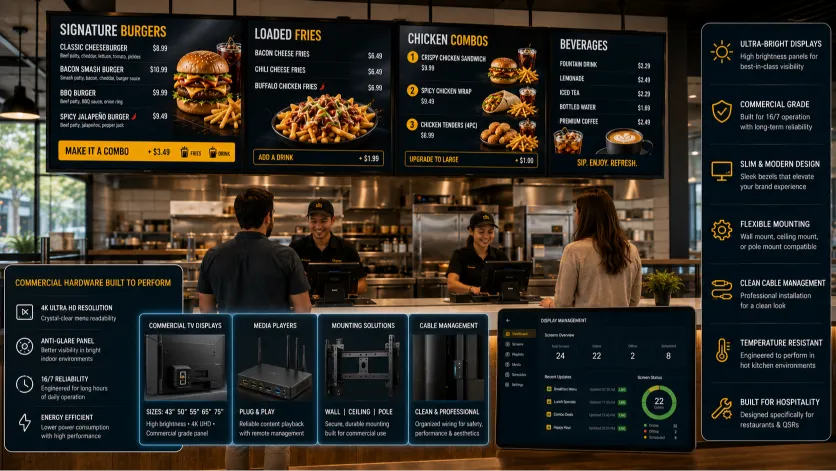
The Severe Limits of Using Consumer Home TVs
While buying a cheap home TV from a local electronics store might seem like an easy way to save money, domestic displays are simply not built to handle the heat, dust, and continuous operation of busy **commercial menu displays**.
Continuous Operation
Consumer TVs are designed for 4 to 6 hours of daily use. Running them 16+ hours a day in a restaurant quickly leads to screen burnout, pixel degradation, and total failure.
Grease and Heat Resistance
Kitchen grease mist, rising humidity, and extractor heat quickly clog standard home TVs. Commercial panels feature active cooling systems to keep running cool.
Vibrant Readability
Standard TVs can't cut through the bright glare of restaurant lighting. Commercial displays offer high-nit brightness ratings and matte coatings to keep menus perfectly legible.
Engineered to Survive Severe Kitchen Environments
Investing in genuine **restaurant grade tv screens** ensures your displays can survive the harsh physical environment of a busy professional kitchen.
These specialized screens are built with industrial-grade cooling vents, sealed internal circuitry, and durable plastic casings. This prevents airborne oil, dust, and moisture from settling inside the hardware, avoiding short circuits and display failures.
Furthermore, commercial displays come backed by dedicated manufacturer warranties that cover continuous in-store use—coverage that is completely voided the moment you install a domestic consumer TV in a commercial space.
Understanding the Commercial Digital Signage Hardware Stack
A professional digital display setup goes beyond just picking the right screen. You need a complete, reliable **commercial digital signage hardware** stack to keep your system running smoothly.
High-Performance Media Players
The media player is the brain behind your display. While cheap smart TVs with built-in web browsers can handle simple static images, complex layout grids and subtle animations require dedicated hardware players (like Android or Windows-based media boxes) plugged securely into your HDMI port to ensure absolute stability.
Heavy-Duty Mounting and Clean Cable Paths
Overhead installations require heavy-duty, VESA-compliant steel mounting brackets designed to secure heavy monitors safely. Running power and data cables through internal channels inside the mounts ensures your counter area looks clean, professional, and uncluttered.
Pick Ultra-Thin Bezels for a Clean Seamless Look
Choosing the right **menu board monitors** is key to building an easy-to-read display wall that catches customers' attention.
Monitors designed for commercial use feature ultra-thin outer borders (bezels). This allows you to mount multiple screens side-by-side with minimal gaps, creating a clean, seamless look that is easy to scan.
These commercial displays also support both horizontal (landscape) and vertical (portrait) orientations, and feature wide viewing angles to ensure customers can read prices clearly from anywhere in your queue.
Solving Real Operations & Hardware Headaches
We approach restaurant hardware from an operational perspective, helping you invest in equipment that looks great and keeps running reliably.
- No More Screen Burnout: Commercial-grade panels protect your screens from image burn-in, even when displaying static layouts all day.
- Cut Down Glare and Reflections: Specialized anti-glare screen treatments keep your menus perfectly legible under bright indoor lights.
- Avoid Overheating Failure: Built-in active cooling fans prevent screens from overheating, even when mounted close to kitchen exhaust lines.
- Heavy-Duty Security: VESA-compliant mounting systems ensure overhead displays are securely and safely anchored above your counter.
Related Digital Menu Board Solutions
Optimize every aspect of your display setup. Explore more specialized configurations designed to fit your unique space.
Frequently Asked Questions
Answers to common questions about picking the right screens, installation requirements, and hardware warranties.
What is the main difference between commercial and consumer TVs?
Commercial displays are built for continuous 16/7 or 24/7 use, feature higher brightness ratings (nits), anti-glare coatings, and durable hardware. Consumer TVs are only built for 4-6 hours of daily use and don't feature cooling systems to survive kitchen heat and grease.
How bright should an indoor commercial screen be?
For standard indoor restaurant lighting, we recommend displays with at least 500 nits of brightness. If your venue has large windows or gets direct sunlight, screens with 700+ nits are best to prevent glare.
Can I use standard TV mounts for overhead installations?
No. Overhead commercial installations require heavy-duty, VESA-compliant steel brackets. These are designed to handle continuous heavy loads and allow you to angle screens downward for optimal visibility.
Do standard TV warranties cover commercial in-store use?
No. Standard consumer TV warranties are immediately voided if the screen is installed in a commercial business. True commercial-grade displays come backed by 3-year commercial warranties that cover continuous in-store use.
What is a media player, and do I really need one?
A media player is a small device (like an Android or Windows box) that connects to your display via HDMI. While some smart TVs can load menus via built-in web browsers, a dedicated media player ensures smoother transitions, better animation support, and greater overall stability.
How do I protect screens from kitchen grease and heat?
Commercial monitors feature sealed enclosures and active internal fans that push dust and grease away from vital components. For high-grease areas directly over fryers or griddles, we recommend using protective display enclosures with built-in air filters.
Invest in Displays Built for Your Kitchen Today
Ditch cheap home screens that burn out. Upgrade to rugged commercial displays designed to keep your menus bright, readable, and running smoothly year after year.
Explore more industry-specific tools and solutions: