
Best Practices for Restaurant QR Code Printing
A brilliant digital menu is useless if your guests can't scan it. Master the physical execution of qr code printing to ensure your codes survive daily wipe-downs, avoid lighting glare, and scan flawlessly every single time.
Why Physical Execution Matters
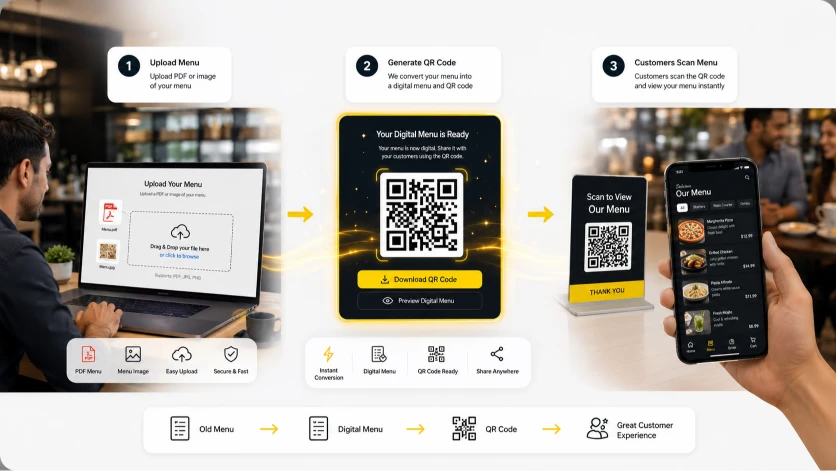
You can have the most beautiful digital interface in the world, but if your physical prints fail, your dining room grinds to a halt. Proper sizing, material selection, and placement are critical to a frictionless guest experience.
Avoid Glare Traps
Glossy lamination reflects overhead pendant lights. If the camera sees a glare instead of the black data squares, the code simply will not scan. Matte finishes are mandatory.
Survive Sanitization
Your tables are wiped down with harsh chemicals dozens of times a day. Standard paper prints will dissolve and bleed. You must utilize industrial, waterproof materials to protect your investment.
Clear Call to Action
Don't just print a black square. Framing your code with explicit text like "Scan for Menu & Ordering" provides clear instruction and reduces confusion for older dining demographics.
Deploying Restaurant Table Tents
Creating effective restaurant table tents is one of the most popular methods for deploying your digital menu across your dining room. A well-designed table tent acts as a miniature billboard on every table, drawing the guest's eye immediately upon seating. When executing your strategy, it is crucial to ensure that your restaurant table tents are printed on durable, high-quality cardstock or encased in acrylic holders to withstand daily wear and tear. Placing the code on both sides of the tent ensures that guests sitting across from each other can access the menu simultaneously without awkwardly passing the physical display back and forth. By keeping the design clean and the call-to-action prominent, you guarantee a frictionless start to the dining experience.
Utilizing Flat QR Code Stickers
For high-turnover environments like fast-casual spots or outdoor patios, deploying qr code stickers directly onto the table surface is often the most efficient approach. Unlike freestanding displays that can blow away in the wind or get knocked over by busy waitstaff, heavy-duty qr code stickers remain permanently affixed and accessible. When choosing this route, it is imperative to use industrial-grade, waterproof vinyl with a matte finish. A glossy finish can reflect overhead lighting or sunlight, making it difficult for smartphone cameras to focus on the code. Strategically placed stickers save physical space on smaller tables while ensuring that the ordering portal is never out of reach or obscured by plates and glasses.
Choosing Scannable Menu Materials
Selecting the appropriate scannable menu materials is a critical step that many restaurant owners overlook until their codes start failing mid-service. The physical medium you choose directly dictates how well the camera lens can capture the digital data points. The absolute best scannable menu materials are those that offer a high-contrast, matte finish. If you print your codes on highly glossy photo paper or laminate them with reflective plastics, the glare from your dining room's overhead pendants or outdoor sunlight will blind the smartphone camera, causing massive frustration for your guests. Instead, opt for heavy PVC cards, matte-laminated cardstock, or even etched metal plates for high-end establishments. It is also vital to consider the longevity of the material; raw paper products will quickly degrade when exposed to condensation from water glasses or routine sanitization wipe-downs. Investing in premium, wipeable, and strictly non-reflective materials ensures a flawless scan success rate every single time your guests sit down.
Elevating Brand with Custom QR Code Design
Beyond just the physical print, implementing a custom qr code design significantly elevates your brand's overall professionalism. A generic, jagged black-and-white square can feel cold, tech-heavy, or out of place in a carefully curated dining room. With modern generation tools, a custom qr code design allows you to seamlessly integrate your brand's primary color palette and even embed your restaurant's logo directly into the center of the code. However, you must maintain a high contrast ratio—always use a dark color for the data points against a light background, as inverted colors often fail to scan on older smartphones. By framing your customized code with a clear, actionable instruction like "Scan to Order" or "View Our Menu," you remove all ambiguity and perfectly bridge the gap between your physical ambiance and your digital ordering platform.
Explore More Mobile QR Features
Ensure your digital deployment is a massive success by exploring our deep-dive guides into menu aesthetics and operational turnover.
Frequently Asked Questions
Ensure your prints are flawless with these expert answers on sizing, materials, and digital integration.
What is the ideal size for QR code printing?
For restaurant tables, the QR code itself should be printed no smaller than 1.5 x 1.5 inches (3.8 x 3.8 cm). This ensures older smartphones and cameras with poor focus can still easily scan the matrix without forcing the guest to hover too closely.
Which finish is best for QR code printing?
Always select a matte finish. Glossy laminates, shiny acrylics, or high-gloss photo paper will reflect overhead lighting or outdoor sunlight, blinding the smartphone camera and making the code entirely unscannable for your diners.
Can I use restaurant table tents outdoors?
Yes, provided you protect them. For outdoor patios, paper table tents will blow away or degrade from condensation. It is best to encase printed cards in heavy acrylic holders or print directly onto weighted PVC blocks to withstand the elements.
Are QR code stickers easily removable?
It depends entirely on the adhesive. For restaurant tables, you should opt for industrial-grade vinyl stickers with semi-permanent adhesives that resist peeling from daily wipe-downs but can be removed with adhesive solvent when you update your decor.
What color should my custom QR code design be?
To guarantee 100% scannability, always use a dark color for the data modules (the code itself) set against a very light or white background. Inverting these colors (light code on dark background) will cause many older smartphone cameras to fail.
Do I need to reprint my QR code if I change my menu?
No. When using a professional digital menu system, you are utilizing 'Dynamic QR Codes'. The code routes to a permanent URL link. When you update your menu items or prices in the dashboard, the URL remains the same, meaning your physical prints never need to be replaced.
What are the most durable scannable menu materials?
For the highest durability, avoid raw paper. The best materials are matte-finished PVC cards, laser-engraved anodized aluminum plates, or heavy-duty matte vinyl stickers. These materials survive hundreds of daily sanitization wipe-downs without fading.
Where is the best place to position the code on a table?
Position the code where it is immediately visible but out of the direct spill zone. The bottom right corner of the table or elevated in the center within a table tent are the most effective placements to ensure it isn't covered by plates.
Can I put a logo inside my custom QR code design?
Yes. Modern QR codes possess 'error correction' capabilities, meaning a small logo can be placed perfectly in the center without breaking the code. Just ensure the logo does not obscure the three large positional squares in the corners.
How do I test my QR codes before printing a large batch?
Never send a large batch to the printer without testing. Print a single test sheet at the exact intended size. Test scanning it using multiple devices (both new and old iPhones and Androids) under the actual lighting conditions of your dining room.
Ready to Deploy Your Digital Menus?
Generate highly scannable, beautifully customized QR codes integrated directly into our powerful mobile ordering system. Start optimizing your restaurant today.
Explore more industry-specific tools and solutions: