
High-Visibility Restaurant Screen Displays for Counter Optimization
Stop letting counter congestion slow down checkout lanes. Deploy synchronized digital screens that reduce perceived wait times, improve decision-making, and boost ticket size automatically.
The Cost of Slow, Confusing Cashier Lanes
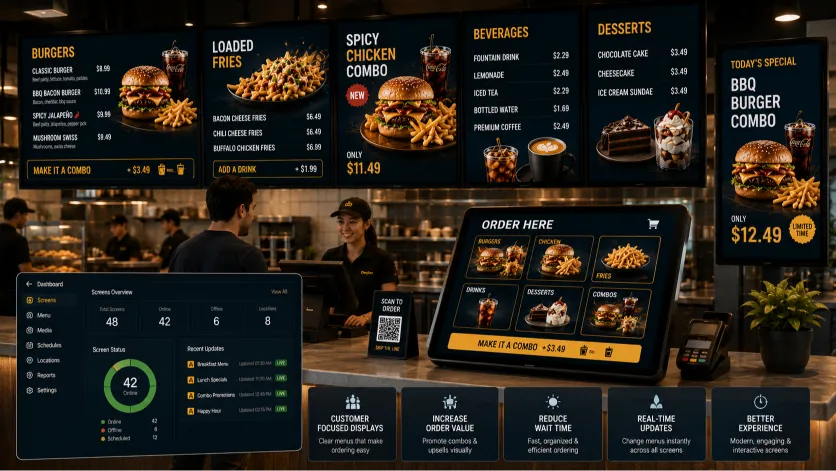
A busy checkout counter is the most critical touchpoint in your venue. When customers can't read prices easily or understand options, lines back up, cashier stress increases, and you miss out on high-margin upsells. Installing modern **restaurant screen displays** is the single best way to streamline counter operations.
Slash Line Congestion
When layouts are simple and prices are easy to read, customers decide faster, preventing backups at the register during peak shifts.
Visual Combo Upsells
Highlight sides, drinks, and combo sets clearly on-screen, prompting customers to upgrade their orders naturally without pressure.
Order with Confidence
Clear, high-contrast layouts help diners identify allergens, vegetarian options, and add-ons, making checkout simple and fast.
Drive Add-On Sales with Customer-Facing POS Displays
Integrating a modern **pos menu display** directly at the register turns checkout interactions into a powerful upselling opportunity.
Showcase real-time order summaries, tax details, and prompt customers with targeted add-ons—like premium dipping sauces, seasonal sides, or drink upgrades—right as they pay. This keeps ordering clear and raises average ticket values naturally.
By displaying order confirmations directly, customers can verify their items in real-time, virtually eliminating order errors and keeping your kitchen running smoothly.
Using Layout Design to Guide Customer Attention
Our **counter menu screens** are built around visual psychology to make scanning large menus straightforward and fast.
Visual Spacing and Clutter Reduction
Packing screens with too many images or tiny text blocks causes visual fatigue, slowing down ordering lines. Leaving adequate breathing room (negative space) on your displays makes pricing easy to read and speeds up the checkout flow.
Save Cashier Explanation Time
Stop forcing your cashiers to explain every cup size, flavor profile, or side combo. Display item customizations, sizes, and pricing structures clearly on your displays to keep your lanes moving smoothly.
Centralized Control for Your Digital Ordering screens
Our secure cloud-based **digital ordering screens** platform lets you manage all your screens from one simple dashboard.
Easily edit pricing, launch promotional banners, or add limited-time offers across specific screens or locations instantly. No graphic design experience needed.
If an ingredient runs out mid-rush, simply log into the dashboard from your phone or POS and update the menu in real-time. This keeps communication clear and prevents customer disappointment at checkout.
Solving Real Front-of-House Pain Points
We approach restaurant hardware from an operational perspective, focusing on designs that look great and actively help you run a better service.
- Reduce Wait Times: High-visibility screens help customers decide what to order quickly, cutting down line wait times.
- Consistent Pricing: Ensure corporate and regional pricing is always consistent across every screen, everywhere.
- No More Reprint Costs: Stop paying for printed posters and shipping every time you update a price or menu item.
- Dynamic Combo Features: Use clean visual paths and icons to highlight combo deals, helping diners choose complete meals easily.
Related Digital Menu Board Solutions
Optimize every display in your venue. Explore more specialized configurations designed to fit your unique space.
Frequently Asked Questions
Answers to common questions about picking screen sizes, POS compatibility, and remote cloud management.
What screen sizes are best for restaurant counters?
For overhead displays, screens between 43" and 55" are ideal. For small, customer-facing POS register displays, monitors between 10" and 15" are standard.
Does this software integrate with my existing POS system?
Our platform can sync directly with many modern cloud POS systems, allowing you to update prices and hide out-of-stock items automatically.
How do customer-facing register displays help increase sales?
By showing real-time order summaries and prompting diners with targeted add-ons (like drinks or sides) right as they pay, boosting average ticket size naturally.
Are these templates easy to read from the back of the queue?
Yes. Our designs use optimal typography sizes and high contrast ratios, ensuring your menu remains perfectly legible from anywhere in your line.
What brightness rating (nits) is required for counter screens?
For standard indoor lighting, we recommend screens with at least 500 nits. If your counter gets direct sunlight, screens with 700+ nits are best to prevent glare.
How do I update menus across multiple screens remotely?
Simply log into our secure cloud dashboard from any smartphone or tablet to manage screens, edit pricing, or run promotions across any location instantly.
Optimize Your Restaurant Counter Today
Stop letting slow queues back up your register. Upgrade to clear, synchronized digital screens that speed up ordering and drive average ticket values up naturally.
Explore more industry-specific tools and solutions: