
High-Converting Digital Menu Board Design Templates & Software
Stop confusing your customers with cluttered screens. Leverage smart digital menu board design strategies to improve readability, speed up orders, and maximize high-margin upsells.
How Menu Board Layout Alters Ordering Behavior
A poorly structured screen doesn't just look unappealing—it actively hurts your profit margins. Implementing strategic **digital menu board design** rules helps guide eye movement, speeds up decision-making, and drives ticket values up.
Faster Decision Speed
When layouts are clean and prices are easy to read, customers choose faster. Clear visual structures help prevent backups at checkout lines.
Smart Visual Hierarchy
Grouping items logically and using contrasting fonts guides customer attention to high-profit entrees and add-ons naturally.
Order with Confidence
Presenting ingredients, allergen tags, and combo upgrade choices clearly on your screens makes ordering straightforward and stress-free.
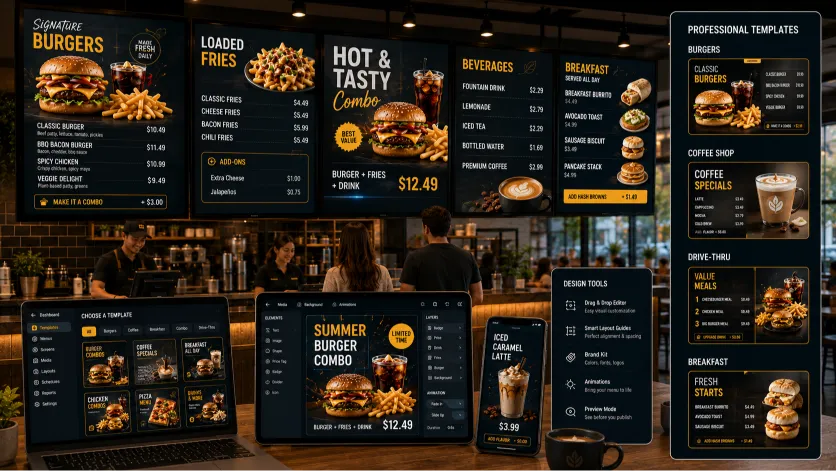
Menu Board Templates Designed for Fast-Paced Kitchens
Our **menu board templates** are built to meet the real operational demands of busy hospitality environments, not just look pretty on desktop screens.
We provide specialized templates built for different dining styles. Access quick-scanning, multi-column layouts for fast-food counters, elegant landscape layouts for coffee houses, and high-contrast, bold-font setups for outdoor food trucks and drive-thru lanes.
Because these layouts are built with flexible templates, you can update pricing, description lines, or seasonal assets inside our dashboard in seconds. No graphic design experience needed.
The Science Behind Effective Restaurant Signage Design
Creating highly legible **restaurant signage design** layouts is all about understanding customer behavior and how people scan overhead screens in busy environments.
Understanding Eye Tracking Behavior
When customers look at an overhead screen, their eyes scan in a natural "Z-pattern"—starting at the top left, moving across to the top right, and then dropping down. Placing your highest-margin specials or promotional imagery in these key visual zones helps naturally boost their sales.
Avoiding the Clutter Trap
Adding too many photos or tiny fonts to your screens causes visual fatigue and makes it harder for diners to choose. Leaving adequate breathing room (negative space) on your displays makes prices easy to read and speeds up ordering lines.
Build Cohesive and Flexible Multi-Screen Layouts
Our **custom digital menu layouts** help independent operators keep their branding consistent across every screen in their venue.
Customize background styles, import your logo, and pick fonts that perfectly match your brand's style. Keep your look consistent across single displays or multi-screen video wall layouts.
Want to run a seasonal promotion? Schedule temporary, high-visibility promotional panels to take over specific screens automatically during lunch or dinner shifts to drive seasonal promo sales.
Solving Common Menu Layout Pitfalls
Our software is designed to solve common menu layout issues that cause customer confusion and slow down checkout lanes.
- Messy Chalkboards: Replace hard-to-read, dusty chalkboards with clean, high-contrast digital text blocks.
- No More Tiny Fonts: Our templates enforce optimal font sizes, making menus easy to read from anywhere in your queue.
- Prominent Combo Upsells: Highlight drink and side add-ons clearly alongside main dishes to boost average ticket values.
- Manage Multi-Screen Syncing: Keep text, pricing, and visual themes perfectly consistent across multiple screens in your venue.
Related Digital Menu Board Solutions
Optimize every display in your venue. Explore more specialized configurations designed to fit your unique service style.
Frequently Asked Questions
Answers to common questions about customizing templates, matching your branding, and optimizing layouts.
Can I customize these templates to match my restaurant's exact colors?
Yes. Our templates are fully customizable. You can easily select your brand's color codes, upload your custom logo, and choose fonts that perfectly match your restaurant's style.
How many items should I put on a single screen layout?
To keep things readable and clean, we recommend displaying no more than 20 to 25 items on a single screen. If you have a larger menu, splitting your categories across multiple screens is the best way to avoid clutter.
Does the layout software support vertical (portrait) screens?
Yes. Our editor fully supports both standard horizontal (landscape) and vertical (portrait) layouts. You can easily toggle orientations in the dashboard.
Can I add subtle animations or video clips to my layouts?
Absolutely. You can easily insert subtle transitions, animated banners, or MP4 video clips into dedicated promo zones in your templates to capture customer attention.
What image sizes should I use for food photos in the templates?
We recommend using high-res JPEG or WEBP images shot in standard 16:9 or 4:3 ratios to ensure your food photography looks crisp and professional on 1080p and 4K TV screens.
Can I manage layouts for different locations from a single dashboard?
Yes. Our cloud-based system lets you manage layouts, update pricing, and schedule promotions across multiple franchise sites or branches from one central account.
Design Better Menus for Your Venue Today
Ditch messy static boards, speed up decision-making, and boost average ticket values with smart, high-converting digital templates designed for busy kitchens.
Explore more industry-specific tools and solutions: