
Stop Losing Sales to Frustrating PDF Menus
When evaluating the best mobile ordering solution for your restaurant, the debate of pdf vs interactive menus is the most critical decision you will make. Discover why static files hurt your brand and how interactive platforms drive higher revenue.
The Hidden Cost of the "Quick Fix"
During the rapid shift to digital dining, thousands of restaurants simply linked a QR code to a PDF hosted on their website. While cheap and fast to deploy, this static approach creates massive friction for the end user.
The Pinch & Zoom Problem
A PDF is formatted for an 8.5x11 sheet of paper. When shrunk to a 6-inch phone screen, text becomes illegible. Forcing customers to pinch, zoom, and pan around a document is incredibly frustrating.
Slow Download Speeds
High-resolution PDF files are heavy. If your diner is sitting on a patio with a weak 4G connection, downloading a 10MB PDF menu can take minutes, delaying the entire service cycle.
Zero Upselling Power
A static file cannot suggest a side of fries when a user looks at a burger. It is a dead end that relies entirely on your servers to drive higher average ticket values.
Why the Static PDF Menu Fails on Mobile
When the pandemic first hit, many restaurants scrambled and uploaded a static pdf menu to a QR code. While this was a quick fix, it is fundamentally flawed for mobile devices. A static pdf menu is essentially a digital photograph of an 8.5x11 inch piece of paper forced onto a 6-inch smartphone screen. Guests are forced to constantly pinch, zoom, and pan around the document just to read the prices. Furthermore, these files are often large and take too long to download on a weak cellular connection. Most importantly, a static pdf menu is a dead end—it cannot accept orders, it cannot suggest add-ons, and it cannot track analytics. It simply provides information in the most frustrating, frictionless way possible, often causing guests to give up and just order whatever is easiest rather than what is most profitable.
The Power of an Interactive Digital Menu
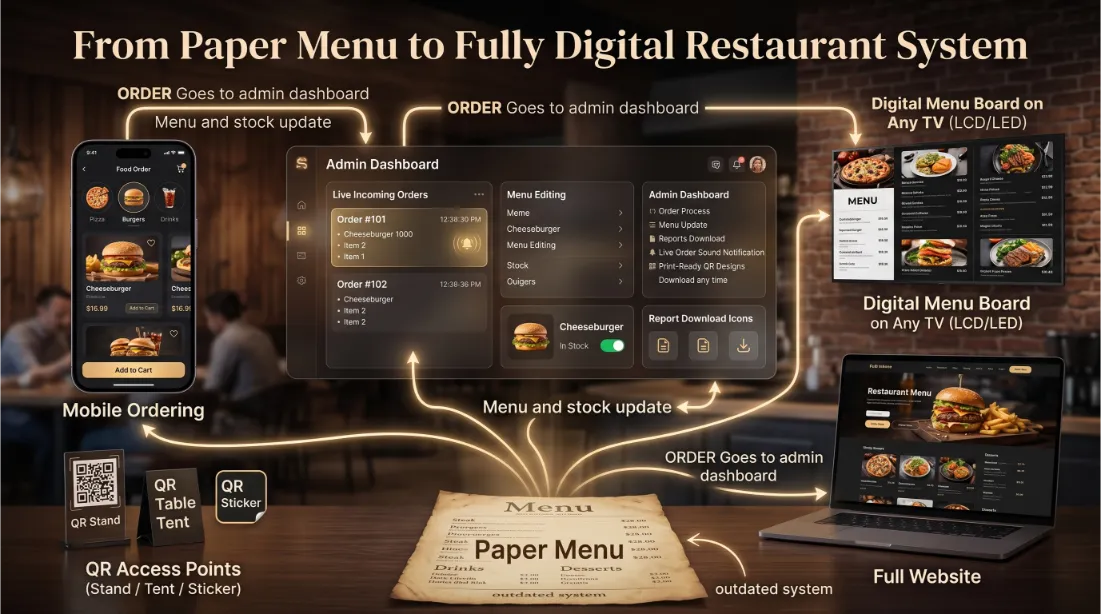
Conversely, transitioning to an interactive digital menu transforms the entire customer journey into a smooth, app-like experience without requiring any downloads. An interactive digital menu is built using responsive web design, meaning the text, images, and buttons automatically resize to perfectly fit whatever device the customer is holding, whether it's an old iPhone or a brand-new Android tablet. Categories are cleanly separated with sticky headers, allowing diners to jump from appetizers to desserts with a single tap. More importantly, an interactive digital menu is alive—you can hide sold-out items instantly, update prices in real-time without reprinting, and integrate high-resolution food photography for every single dish. This dynamic environment removes all visual friction, making the browsing process highly enjoyable and directly encouraging guests to explore the full depth of your culinary offerings.
Engineering a Flawless Mobile Ordering Experience
The ultimate goal of upgrading your technology is to create a flawless mobile ordering experience. When diners sit down, they want control, speed, and clarity. A superior mobile ordering experience empowers them to customize their meals precisely how they want them, selecting modifiers like 'no onions' or 'extra cheese' through simple checkboxes. This level of control reduces ordering anxiety and eliminates miscommunications between the guest, the server, and the kitchen. When the interface is clean and loads instantly, the customer feels confident in placing their order. Additionally, a great mobile ordering experience integrates seamlessly with digital payment gateways, allowing the guest to view an itemized bill, apply a tip, and pay the check in under thirty seconds. This end-to-end digital journey leaves a lasting positive impression, significantly increasing the likelihood of return visits.
Maximizing Restaurant Menu Conversion
At the end of the day, your menu is a sales tool, and optimizing for restaurant menu conversion is how you increase your profit margins. Static files do absolutely nothing to drive sales, but interactive systems are engineered specifically for restaurant menu conversion. By utilizing automated upselling algorithms, the system can prompt a user to add a side of fries when they select a burger, or suggest a specific wine pairing with a steak. Furthermore, by strategically placing high-margin items at the top of digital categories and accompanying them with vibrant, mouth-watering photos, you naturally guide the customer's purchasing behavior. Analyzing the data from these platforms allows you to see exactly where users drop off and which items perform best, giving you the power to continuously tweak your layouts to maximize your restaurant menu conversion rates.
Explore More Mobile QR Features
Ensure your digital deployment is a massive success by exploring our deep-dive guides into menu aesthetics and operational turnover.
Frequently Asked Questions
Clear up the confusion between static and dynamic digital menus to make the best choice for your venue.
Why is a PDF menu a bad experience for restaurant customers?
A PDF is designed for an 8.5x11 printed page, not a 6-inch smartphone screen. Customers must awkwardly pinch, zoom, and pan just to read descriptions, leading to high frustration and a higher likelihood of abandoning the ordering process.
Can customers order directly from a PDF menu?
No. A PDF is simply a digital photograph of text. It cannot process selections, handle modifiers, or securely take payments. It requires the customer to wait for a server to physically take their order, offering no operational speed benefits.
How does an interactive digital menu increase sales?
Interactive menus actively sell. They utilize automated upselling algorithms to suggest add-ons, feature high-definition photos that trigger impulse buys, and make the checkout process so seamless that customers are more likely to order an extra round of drinks.
Do I have to reprint my QR code when I switch from PDF to interactive?
No. If you use a dynamic QR code provider, you can simply update the destination URL in your dashboard to point from the old PDF file to your new interactive web application without reprinting a single table tent.
Which format loads faster on a customer's phone?
Interactive menus load significantly faster. High-resolution PDF files can easily exceed 5MB to 10MB, which takes a long time to download on a weak cellular connection. Interactive web menus load modularly and instantly.
Can I track how many people look at my menu?
With an interactive menu, yes. You gain deep analytics into page views, most clicked items, and drop-off rates. With a static PDF, you have zero visibility into customer behavior once the file is downloaded.
How hard is it to update prices on an interactive menu vs a PDF?
Updating an interactive menu takes seconds via a cloud dashboard—you just type the new price and save. Updating a PDF requires going back to the original design file (like InDesign or Word), exporting a new PDF, and re-uploading it to your server.
Does an interactive menu require customers to download an app?
No. Modern interactive menus are built as Progressive Web Apps (PWAs). They load instantly inside the user's native web browser (Safari or Chrome) immediately after scanning the QR code, removing all friction.
Can I hide sold-out items on a PDF?
No. If an item is on the PDF, the customer will try to order it, leading to disappointment when the server tells them it is 86'd. An interactive menu allows you to hide sold-out items instantly with one click.
Is an interactive menu better for accessibility (ADA compliance)?
Yes. Interactive web menus are built with HTML/CSS, meaning screen readers for the visually impaired can easily read the text aloud. PDFs are often rendered as flat images, making them entirely inaccessible to screen reading software.
Ready to Ditch the PDF?
Upgrade to a fast, responsive, and highly profitable interactive digital menu system today. Turn passive readers into active buyers instantly.
Explore more industry-specific tools and solutions: