
Contactless QR Code Menus for Modern Dining
Allow your diners to scan, browse, and order directly from their smartphones. Increase table turnover and eliminate printing costs with a premium interactive menu.
Why Restaurants Are Ditching Paper Menus
Printed menus get dirty, tear easily, and cost a fortune to replace every time you need to update a price. Digital QR menus solve these problems instantly.
Zero App Downloads
Customers don't want to download another app. Our system utilizes native browser technology—they just point their camera at the code and the menu opens instantly.
Real-Time Cloud Updates
Run out of a special ingredient? Change the item status to "Sold Out" from your dashboard and it updates immediately on every customer's phone in the dining room.
Faster Table Turnover
Stop making guests wait for a waiter to bring physical menus. Diners can sit down, scan, and decide what they want to order within seconds of arriving.
The Ultimate Tableside Ordering Experience
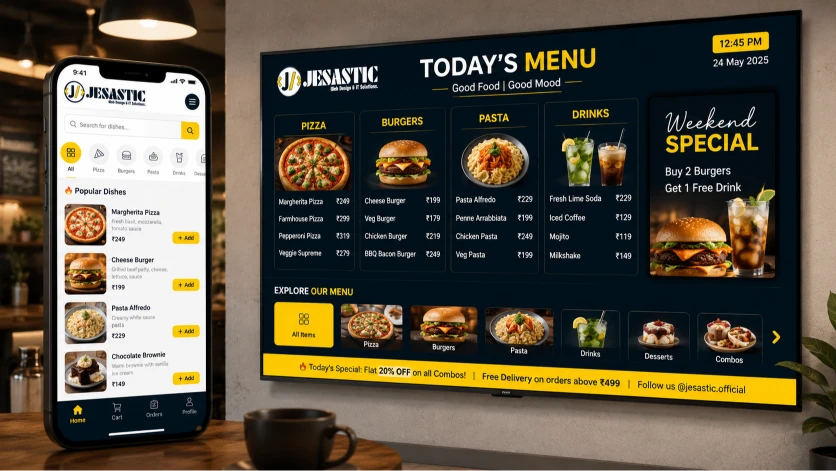
A basic PDF menu uploaded to a website isn't enough anymore. Diners expect to pinch, zoom, and struggle to read small text on PDF menus. Our premium interactive QR menus are built specifically for mobile screens, ensuring a frictionless ordering experience.
Maximize Order Values
When customers can clearly see high-resolution photos of your appetizers, specialty drinks, and desserts right on their phone, they order more. Our system supports item variations, modifiers (like "extra cheese" or "spice level"), and add-ons to naturally increase your average ticket size without your staff having to hard-sell.
Full Customization & Branding
Your digital menu is an extension of your restaurant's atmosphere. Customize your menu's colors, typography, and layout to perfectly match your brand identity. Include your logo, business address, Google Map directions, and direct call/WhatsApp buttons right inside the menu interface.
Perfect for Any Hospitality Environment
From fast-casual joints to upscale dining, our interactive QR code system adapts to your unique operational flow.
Dine-In Restaurants
Place a unique QR code on every table. Let guests browse the digital menu at their own pace, reducing pressure on your waitstaff during peak hours.
Bars & Nightclubs
Speed up drink orders in dark, crowded environments. A backlit smartphone screen is infinitely easier to read than a sticky, unlit paper menu.
Food Trucks & Pop-Ups
Print a large QR sticker for the side of your truck. Customers can scan it while waiting in line, so they are ready to order the second they reach the window.
Hotel Room Service
Replace expensive, unhygienic in-room binders. Guests can scan a code on the nightstand to order late-night food directly to their room.
Cafes & Coffee Shops
Highlight your organic roasts and intricate modifications (milk types, syrups). Customers can perfect their complex orders digitally without holding up the line.
Explore QR Menu Strategies
Dive deeper into specific applications and strategies for leveraging mobile tableside ordering to grow your business.
Contactless Ordering Guide
Learn the best practices for transitioning your staff and customers from traditional waiter service to a hybrid QR ordering model.
Learn MoreQR Menu Design Best Practices
Discover how to structure your food categories, utilize high-converting colors, and layout your mobile interface for maximum ease of use.
Learn MoreMaximizing Table Turnover
Focus on speed. Learn how instant digital menus can shave 10-15 minutes off every table's dining time, letting you seat more guests.
Learn MoreMobile Upselling Strategies
Get expert tips on using 'frequently bought together' prompts and high-margin add-ons directly inside the digital menu flow.
Learn MoreQR Code Generation & Printing
Understand the technical side: how to generate unexpiring QR codes, print them securely, and place them optimally on tables.
Learn MorePDF vs Interactive Menus
A deep dive into why simply uploading a PDF of your paper menu is actively harming your customer experience and sales.
Learn MoreFrequently Asked Questions
Here are answers to the most common questions we get from restaurant owners regarding QR ordering.
Do my customers need to download an app to order?
No. Our interactive QR menus use native browser technology. Customers simply open their smartphone camera, scan the code on the table, and your beautiful, mobile-optimized menu loads instantly in their browser.
Does the system take a commission percentage on food orders?
Absolutely not. We operate on a transparent, flat-rate pricing model. You pay a simple setup fee and an annual renewal. We never take a percentage of your food sales or delivery orders.
How do I generate and print the QR codes for my tables?
Once your menu is set up, you can instantly download high-resolution, print-ready QR codes directly from your admin dashboard. You can print these as table tents, stickers, or display cards.
Can I add high-quality photos and descriptions to menu items?
Yes! Unlike a boring PDF, our interactive menus allow you to upload mouth-watering photos for every dish, add detailed descriptions, and list allergy or dietary information to help customers make faster decisions.
How do I update prices if food costs change?
You have full control. Simply log into your secure backend admin dashboard from any device, edit the price of the item, and hit save. The QR code on your tables never changes, but the menu it opens updates instantly.
Digitize Your Tableside Experience
Stop printing paper menus and start maximizing your operational efficiency. Upgrade your restaurant with a premium interactive QR menu today.